

What is PPC?
PPC (Pay Per click) ads provided by AdSense is wonderful ways to earn money online, if you have an established and content-rich website. AdSense ads are targeted ads, which fit to the site's content. Therefore it's likely they will meet the visitors' interests which leads to a high click-through ratio (CTR) on AdSense ads compared to the CTR of normal non-targeted banner ads.
Following are the factors which impact the ad performances:
CPC
Unique visitors and page impressions.
CTR
Targeting
You will increase your PPC revenue by improving one or more of the above factors.
How to increase the CPC?
Ddo some research on different keywords which fit to your blog's topic. Go to Google and perform searches for these keywords. The idea is if more AdWords ads appear in the right bar of Google's search results the likelier it is that ads for the regarding keyword have got a higher CPC.
Now that you know which keywords AdSense should display ads for on your blog the only thing you need to do is to target ads for the keyword(s) you have chosen. You can do this by adding additional and targeted content and by emphasizing words or complete sections of your blog’s page.
Where should I place Google ads on my pages?
Google heatmaps are a way to help describe where a user focuses their attention when looking at a page. Some experiements were done that track eye movement when viewing a webpage. They showed users several different pages with different common layouts. They created a 'heatmap' based upon the users eye movements. The red areas are the areas in which people focused longer or more often. The green less often or not as long. You can use the heat maps to give you an idea of where to best place your ads to draw the most attention and most likely higher click through.
The placement for Google ads in website/blog varies from page to page and its all depends upon the content of your blog. What is the user trying to accomplish by visiting my site? There are certain locations that will shoot up your revenue from Adsense. The following "heat map" illustrates the ideal placements on a sample page layout. The colors fade from dark orange (strongest performance) to light yellow (weakest performance). All other things being equal, ad placements above the fold tend to perform better than those below the fold. Ads placed near rich content and navigational aids usually do well because users are focused on those areas of a page.

For example ,the ads should be placed directly below the end of the content or post to perform well because when the users finishes the article then they are forced to see the ads.Also the user may click the ads related to the post or article published by you.
Blogtimize - Optimize the ads on your blog
When working with a blog, ad implementation challenges are often come in the way of bloggers: a predetermined page format, highly targeted content, and regular visitors et cetera. To Increase the readership, here are a following suggestions:
Blend ads into your blog
To increase the readership and clicks on the ads, blend your ad units into the background of your blog. Choose a bold color for the ad title to help draw attention to your ads, then make sure that the background and borders of your ads are the same color as the background of the area where the ad is placed.
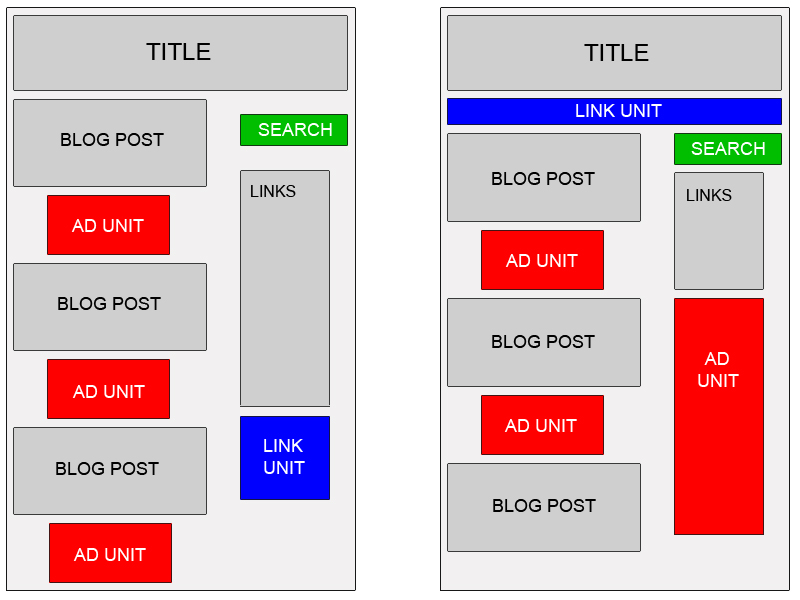
Experiment with multiple ad formats and locations
Wider ad formats are generally more reader-friendly. Placing an ad unit after the first post will likely catch your readers' attention. Also, consider placing a Skyscraper (120x600) or vertical link unit on the right side of your blog.
Offer readers more options with search and referrals
Also use AdSense for search and referrals to make sure you're earning the most revenue possible with AdSense. You can increase your earnings, if you provide readers with valuable information, and take advantage of flexible formats.
Improve ad targeting
With section targeting, one can target an ad unit to a specific section of your blog, as well as block out irrelevant sections like navigational links. One should be well acquainted with HTML basics to implement section targeting.One can learn HTML from http://www.w3schools.com
To implement section targeting, you'll need to add some HTML comment tags to your code. These tags will mark the beginning and end of whichever section(s) you'd like to emphasize or de-emphasize for ad targeting.
The HTML tags to target or emphasize a page section take the following format:
<!-- google_ad_section_start -->
<!-- google_ad_section_end -->
You can also designate sections you'd like to have ignored by adding a (weight=ignore) to the starting tag:
<!-- google_ad_section_start(weight=ignore) -->
Your final code may look like the:
<html><head><title>Section targeting</title></head>
<body>
<!-- google_ad_section_start -->
This is the text of your web page. Most of your content appear here.
<!-- google_ad_section_end -->
</body>
</html>
One can use section targeting to make suggestions about as many sections of a page as one like.
In order to properly implement the section-targetting feature, you'll need to include a significant amount of content within the section targeting tags.Then only one can see the relevant adds placed on the web page.
Increase more traffic to your blog:
If you're a Blogger user, activate the setting to notify Weblogs.com, a blog update notification service, whenever you have updated your blog. That means your blog will be included in various "recently updated" lists on the web as well as other blog-related services.
Go to: Settings > Publishing and make Send Pings as “Yes”.


Post a Comment